
AJAX MotionCam und AJAX MotionCam Outdoor Melder mit Fotos auf Abruf sind ab sofort erhältlich
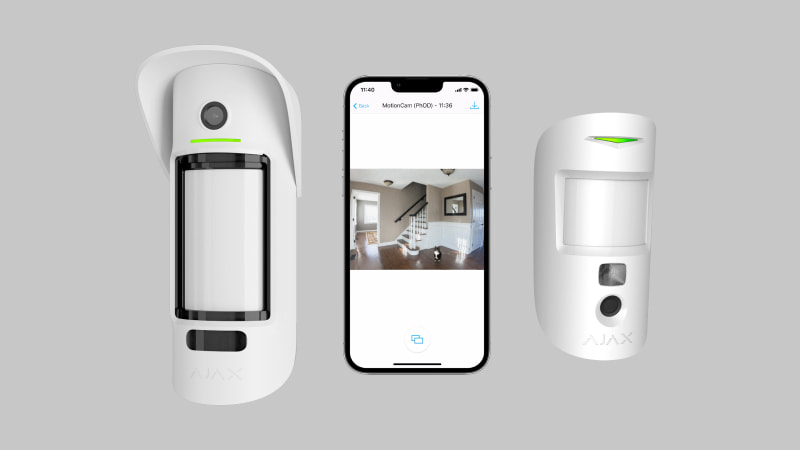
MotionCam (PhOD) Jeweller und MotionCam Outdoor (PhOD) Jeweller erweitern die Produktlinie der Bewegungsmelder, die mit einer Fotokamera zur visuellen Überprüfung von Alarmen ausgestattet sind. Zusätzlich zu den Fotos im Alarmfall können diese beiden neuen Meldermodelle können auf Anfrage des Benutzers oder bei Alarmauslösung eines anderen Systemgerät Fotos aufnehmen. Die PhOD-Melder sind separat erhältlich und haben eine spezielle Kennzeichnung auf der Verpackung und in den Ajax-Apps.
Ajax-Benutzer können jetzt aktualisierte Datenschutzeinstellungen verwenden, um den Zugriff auf visuelle Daten im Sicherheitssystem zu begrenzen. Über das neue Menü „Datenschutz“ kann festgelegt werden, wann genau Benutzer Fotos anfragen können (wenn das System scharfgeschaltet ist oder jederzeit). Außerdem kann festgelegt werden, welche Benutzer eine solche Anfrage stellen, Fotos ansehen oder Videostreams von den in das System integrierten Kameras von Drittherstellern ansehen können.
Zur Vorgeschichte
Die Fotoverifizierung von Alarmen ist bereits zum Standard in der Sicherheitsindustrie geworden. Bewegungsmelder, die Alarme visuell verifizieren, auch wenn das Sicherheitssystem nur über Mobilfunk und ohne externe Stromversorgung funktioniert, haben sich erwartungsgemäß durchgesetzt. Das sehen wir nicht nur am Feedback unserer Partner, sondern auch am Umsatzwachstum. Seit der Markteinführung der Melder MotionCam (2019) und MotionCam Outdoor (2021) hat die Zahl der weltweit verkauften Geräte eine Million erreicht.
Nach den Erfahrungen unserer Kunden schützen diese Melder Häuser, Krankenhäuser, Schulen, Produktionsstätten, Museen und andere völlig unterschiedliche Objekte. Einige Sicherheitsunternehmen und Polizeidienststellen berichten, dass die Zahl der Einsätze aufgrund von Falschalarmen dank der Fotoverifizierung um 95% reduziert werden konnte. MotionCam ist nicht nur bei den Benutzern beliebt, sondern hat auch internationale Anerkennung von Sicherheitsexperten erhalten.
Diese Erfolge basieren auf der praktischen Funktion der visuellen Verifizierung und dem uneingeschränkten Vertrauen der Benutzer. Von Anfang an haben die MotionCam Melder nur im Alarmfall Fotos aufgenommen und übermittelt, wenn diese eine Bewegung erkannt haben. Die Idee war, die Software-Architektur des Melders so zu gestalten, dass Eingriffe Dritter und die Aktivierung der Kamera auf Anfrage ausgeschlossen sind. Der gesamte Prozess von der Aktivierung der Kamera bis zur Darstellung einer Fotoserie in der App ist so sicher wie möglich. Die visuellen Daten werden bei der Übertragung und Speicherung verschlüsselt, nicht auf dem Server verarbeitet oder analysiert und jeder Detektorvorgang wird dokumentiert.
Dank dieses Konzepts haben die Melder das Vertrauen der Nutzer gewonnen, aber die Funktion Foto im Alarmfall schien nicht ausreichend zu sein. Es gab einen ausdrücklichen Wunsch des Marktes, vor allem aus dem professionellen Bereich, nach einer „Foto auf Anfrage“-Funktion.
Ein professioneller Ansatz der Funktion Foto auf Anfrage
Die „Foto auf Anfrage“-Funktion hilft nicht nur dem Endbenutzer zu überprüfen, ob in seiner Einrichtung alles in Ordnung ist, sondern ist auch für einen breiten professionellen Einsatz konzipiert. Die neuen Melder ermöglichen es vertrauenswürdigen PRO-Konten, Fotos zu machen, um Alarme zu verifizieren und Ereignisse zu Überwachungszwecken zu überprüfen oder die Kamera während der Installation zu konfigurieren.
Ein gutes Beispiel ist die Überprüfung von Alarmen und Ereignissen in der PRO Desktop App. Angenommen, ein einzelner Melder oder ein Tamper löst einen Alarm aus, oder die Hub-Zentrale meldet ein Kommunikations- oder Stromproblem. Der zuständige PRO-Benutzer mit entsprechenden Berechtigungen zur Aufnahme von Fotos kann die verdächtigen Aktivitäten überprüfen und bei Bedarf eine Streife losschicken. In PRO Desktop sind die praktischen Grundrisse an das Einrichtungsprofil angehängt und mit wenigen Klicks verfügbar. Der Sachverhalt der Anfrage für das Foto und der Einsatz einer Streife werden protokolliert.
Die „Foto auf Anfrage“-Funktion hilft bei der Auswahl des effektivsten Melderstandorts bei der Installation eines Sicherheitssystems. Ein Installateur muss die MotionCam nicht einmal mit einem doppelseitigen Klebeband befestigen, sondern kann den Melder einfach mit einer Hand halten, ein Foto auf Anfrage über die mobile Ajax PRO-App aufnehmen und den Installationsort entsprechend dem empfangenen Foto anpassen. Die Funktion ist auch praktisch, wenn der Melder im weiteren Betrieb umkonfiguriert wird.
Foto nach Szenario zur Bestätigung anderer Systemalarme
Mit dem Update auf OS Malevich 2.13.1 können Melder mit PhOD-Funktion bei Auslösung anderer Systemgeräte, wie Brand-, Leckage- oder Öffnungsmelder, Fotos aufnehmen, oder bei Betätigung einer Überfalltaste (Panikknopf). Durch das Erstellen eines Szenarios in wenigen Klicks können Benutzer und der zuständige Sicherheitsdienst Fotobestätigungen von Alarmen derjenigen Melder erhalten, die sich in der Nähe oder innerhalb des Sichtfelds des Melders mit PhOD-Funktion befinden.
So kann dank der neuen „Foto nach Szenario“- Funktion ein PhOD-Melder zum Beispiel die Arbeit der Feuerwehr erleichtern. Auslösungen von FireProtect oder FireProtect Plus Meldern können automatisch die Kamera des in der Nähe installierten Bewegungsmelders aktivieren. In wenigen Sekunden kann sich der Leitstellenmitarbeiter ein klares Bild von der tatsächlichen Situation machen. Die Feuerwehr der Stadt reduziert so die Anzahl der Einsätze aufgrund von Falschalarmen erheblich. Es kann zahlreiche ähnliche Szenarien für andere Geräte geben.
Die Funktion Foto nach Szenario wurde als Reaktion auf die Forderung nach Einführung von Fotobestätigungen von Feueralarmen entwickelt kam von unseren Partnern in Norwegen, wo wir ein gemeinsames Projekt zum Schutz eines UNESCO-Weltkulturerbes vor Bränden umgesetzt haben. Dies ist nicht das erste Projekt, bei dem norwegisches Know-how zur Verbesserung der Branderkennung in einem Ajax-Sicherheitssystem zum Einsatz kommt. In der OS Malevich 2.10 haben wir gemeinsam in der FireProtect-Produktlinie die Funktion „Verzögerung von gekoppelten Brandalarmen“ implementiert.
Vollständige Kontrolle der Privatsphäre
Mit MotionCam (PhOD) Jeweller und MotionCam Outdoor (PhOD) Jeweller sind wir beim Schutz der Privatsphäre und beim Zugriff auf visuelle Daten einen Schritt weiter gegangen. Wir haben das Menü Datenschutz in den Hub-Einstellungen implementiert, damit Ajax-Benutzer die „Foto auf Anfrage“ Funktion richtig steuern können.
Mit dem neuen Menü können Benutzer mit Administratorrechten festlegen, welche Benutzer Zugriff auf Fotos von Meldern und Videos von integrierten Überwachungskameras haben. Ein PRO-Konto (z.B. ein Installateur) hat keinen Zugriff auf diese Einstellungen, aber der Hub-Administrator kann ihnen die Anwendung der „Foto auf Anfrage“-Funktion freigeben. Standardmäßig ist die Funktion für alle Benutzer deaktiviert.
Der Hub-Administrator kann den Zugriff auf die Funktion je nach Modus des Sicherheitssystems einschränken, so dass der Benutzer die Fotos auf Anfrage nur dann aufnehmen kann, wenn der Melder scharf geschaltet ist. Der Prozess der Fotoaufnahme ist völlig transparent. Wenn ein bestimmter Melder ein Foto macht, erhalten alle Benutzer eine Benachrichtigung und sehen, wer das Foto gemacht hat. Wichtig ist, dass nur die Benutzer, die Zugang zu den Fotos haben, diese ansehen können.
Neben dem umfassenden Schutz für Ajax-Apps, einschließlich Passcodes und biometrischer Anmeldedaten, Zwei-Faktor-Authentifizierung und standardmäßiger Kontrolle der Sitzungen, bietet das neue Menü „Datenschutz“ eine weitere Schutzebene für Ajax-Sicherheitsbenutzer.
So verwenden Sie die „Foto auf Anfrage“-Funktion
Die Funktion ist nur bei den neuen Meldern MotionCam (PhOD) Jeweller und MotionCam Outdoor (PhOD) Jeweller verfügbar. Melder ohne PhOD Bezeichnung unterstützen diese Funktion nicht, unabhängig von der Firmware-Version.
Die aktualisierten Datenschutzeinstellungen sind mit der Version OS Malevich 2.13 und den folgenden Apps-Versionen verfügbar:
Ajax Security System 2.20.1 für iOS
Ajax Security System 2.23.1 für Android
Ajax PRO: Tool for Engineers 1.14.1 für iOS
Ajax PRO: Tool for Engineers 1.14.1 für Android
Ajax PRO Desktop 3.2 für macOS
Ajax PRO Desktop 3.2 für Windows