
Hikvision Kamera einrichten: Schritt-für-Schritt-Anleitung für optimale Überwachung
"Lernen Sie, wie Sie eine Hikvision Kamera einrichten: Folgen Sie unserer Schritt-für-Schritt-Anleitung für optimale Überwachung."
Hikvision Kamera einrichten: Eine umfassende Anleitung
Die Einrichtung einer Hikvision Kamera kann eine Herausforderung sein, insbesondere wenn Sie neu in der Welt der Überwachungskameras sind. Aber keine Sorge, dieser Artikel bietet eine detaillierte Schritt-für-Schritt-Anleitung, um Ihre Hikvision Kamera optimal einzurichten.
Warum eine Hikvision Kamera?
Hikvision ist ein weltweit führender Anbieter von Sicherheitsprodukten und -lösungen. Die Kameras des Unternehmens sind bekannt für ihre hohe Qualität, Zuverlässigkeit und fortschrittlichen Funktionen. Sie bieten eine Vielzahl von Überwachungskameras für verschiedene Anwendungsbereiche, von Wohngebieten bis hin zu kommerziellen Einrichtungen, und bilden eine verlässliche Basis für eine moderne Videoüberwachung.
Schritt 1: Auswahl der richtigen Hikvision Kamera
Bevor Sie mit der Einrichtung beginnen, müssen Sie die richtige Kamera für Ihre spezifischen Bedürfnisse auswählen. Hikvision bietet eine breite Palette von Kameras, darunter Dome-Kameras, Bullet-Kameras, PTZ-Kameras und mehr. Jede Kamera hat ihre eigenen Vor- und Nachteile, daher ist es wichtig, Ihre Anforderungen zu kennen und die Kamera entsprechend auszuwählen.
Schritt 2: Installation der Kamera
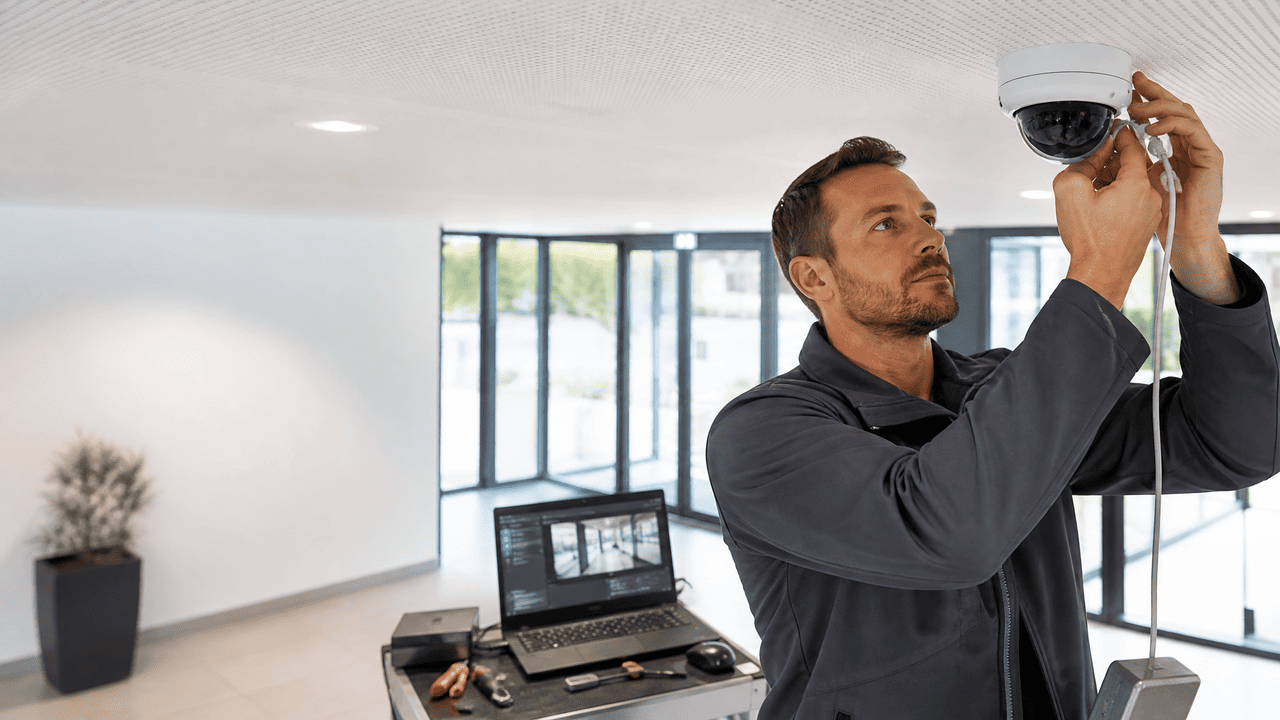
Nachdem Sie die richtige Kamera ausgewählt haben, ist der nächste Schritt die Installation. Die Installation einer Hikvision Kamera ist relativ einfach und kann in der Regel von einer Person durchgeführt werden. Sie müssen die Kamera an der gewünschten Stelle montieren, sicherstellen, dass sie fest sitzt, und dann das Kabel durch das Gehäuse führen und an den entsprechenden Anschluss anschließen.
Schritt 3: Einrichtung der Software
Der nächste Schritt bei der Einrichtung Ihrer Hikvision Kamera ist die Installation und Konfiguration der Software. Hikvision bietet eine kostenlose Software namens iVMS-4200, die Sie auf Ihrem Computer installieren können. Mit dieser Software können Sie die Kamera konfigurieren, Live-Videos anzeigen und Aufnahmen speichern.
- Laden Sie die iVMS-4200 Software von der Hikvision Website herunter und installieren Sie sie auf Ihrem Computer.
- Starten Sie die Software und klicken Sie auf „Gerät hinzufügen“. Geben Sie die IP-Adresse der Kamera, den Benutzernamen und das Passwort ein.
- Nachdem die Kamera hinzugefügt wurde, können Sie die Einstellungen nach Ihren Wünschen konfigurieren. Sie können beispielsweise die Videoqualität einstellen, Bewegungserkennung aktivieren und Aufnahmepläne festlegen.
Schritt 4: Testen der Kamera
Nachdem Sie die Kamera und die Software eingerichtet haben, sollten Sie die Kamera testen, um sicherzustellen, dass alles ordnungsgemäß funktioniert. Überprüfen Sie die Live-Video-Feed, testen Sie die Aufnahme- und Wiedergabefunktionen und stellen Sie sicher, dass die Bewegungserkennung korrekt funktioniert.
Schritt 5: Optimierung der Kameraeinstellungen
Der letzte Schritt bei der Einrichtung Ihrer Hikvision Kamera ist die Optimierung der Kameraeinstellungen. Dies kann beinhalten, die Empfindlichkeit der Bewegungserkennung anzupassen, die Videoqualität zu optimieren oder die Aufnahmepläne zu ändern. Eine sorgfältige Feinabstimmung sorgt dafür, dass die Geräte im Rahmen ganzheitlicher Security technology reibungslos funktionieren und stets die bestmögliche Videoqualität sowie Leistung liefern.
Hikvision Kamera einrichten: Optimale Überwachung durch richtige Einstellungen
Die Einrichtung einer Hikvision Kamera kann zunächst kompliziert erscheinen, aber mit der richtigen Anleitung und etwas Geduld können Sie Ihre Kamera optimal einrichten und die bestmögliche Überwachungslösung für Ihre Bedürfnisse erhalten. Denken Sie daran, dass die Einrichtung nur der erste Schritt ist – es ist genauso wichtig, die Kamera regelmäßig zu warten und die Einstellungen zu optimieren, um die bestmögliche Leistung zu erzielen.
Wie richte ich eine Hikvision Kamera ohne Vorkenntnisse ein?
Mit dem SADP-Tool lässt sich die Kamera aktivieren und eine IP-Adresse vergeben. Danach erfolgt der Zugriff über den Browser oder die iVMS-4200 Software.
Welche Software brauche ich für die Einrichtung einer Hikvision Kamera?
Empfohlen wird die iVMS-4200 Software von Hikvision sowie das SADP-Tool zur Geräteerkennung und IP-Konfiguration.
Wie verbinde ich eine Hikvision Kamera mit meinem Netzwerk?
Die Verbindung erfolgt über PoE oder ein separates Netzteil mit LAN-Kabel, idealerweise im selben Subnetz wie der PC.
Kann ich mit Hik-Connect auch aus der Ferne auf die Kamera zugreifen?
Ja, über ein registriertes Konto bei Hik-Connect können Sie weltweit auf Livebilder und Aufnahmen zugreifen.