
Glasfaseranschlussdose richtig installieren – Eine Anleitung
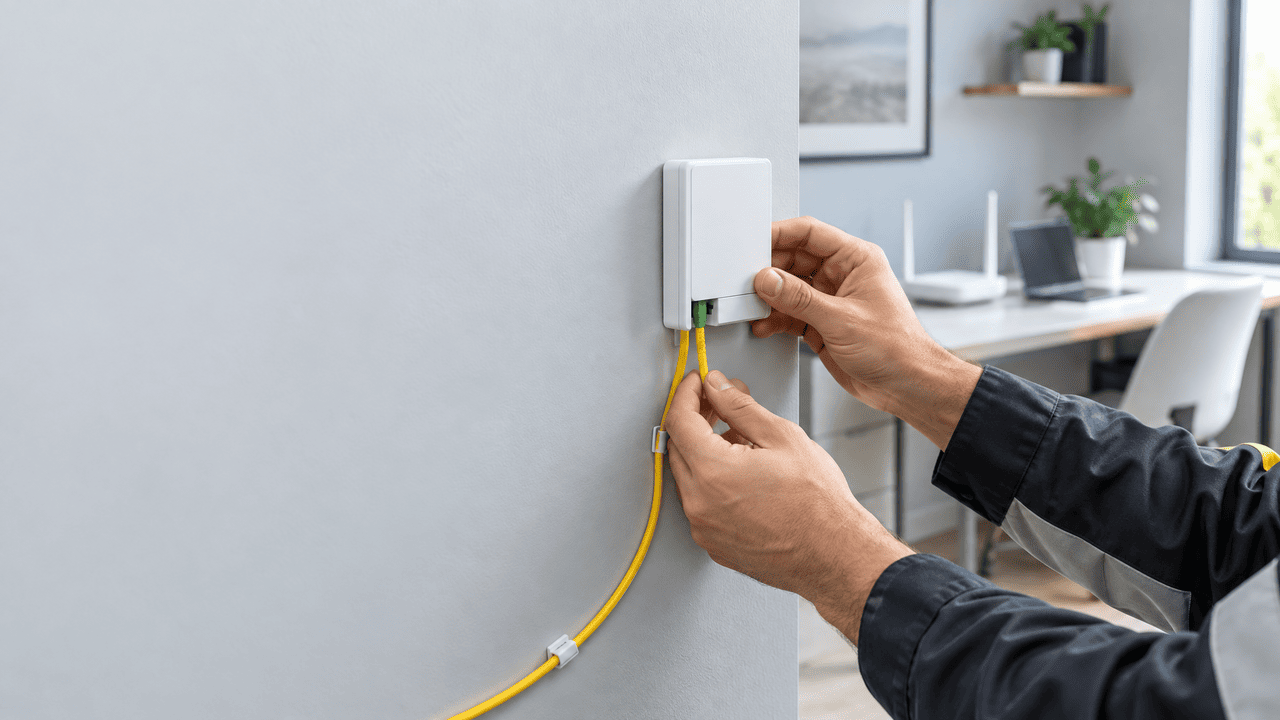
Eine korrekt installierte Glasfaser-Anschlussdose ist die Grundlage für eine stabile und schnelle Internetverbindung. Im Gegensatz zu Kupferleitungen übertragen Glasfaserkabel Daten über Licht und bieten dadurch eine hohe Bandbreite sowie eine geringe Störanfälligkeit. Gleichzeitig reagieren die empfindlichen Fasern sensibel auf Knicke, starke Zugbelastungen und unsachgemäße Verbindungen.
In dieser Anleitung erfahren Sie, worauf Sie bei der Montage einer Glasfaser-Anschlussdose achten sollten, welche Werkzeuge benötigt werden und wann die Installation besser von einem Fachbetrieb durchgeführt werden sollte.
Vorbereitung der Installation
Geeigneten Montageort für die Glasfaser-Anschlussdose auswählen
Der Montageort sollte möglichst nahe am Glasfaser-Übergabepunkt beziehungsweise am Hausanschluss liegen. Dadurch lassen sich unnötig lange Leitungswege vermeiden. Gleichzeitig muss ausreichend Platz vorhanden sein, damit das Kabel ohne enge Bögen zur Anschlussdose geführt werden kann.
Achten Sie außerdem darauf, dass die Dose später problemlos erreichbar bleibt. Dies erleichtert Wartungsarbeiten, Messungen und mögliche Änderungen an der Netzwerkinfrastruktur. Feuchtigkeit, starke Wärmequellen und direkte Sonneneinstrahlung sollten am Montageort vermieden werden.
Benötigte Werkzeuge und Materialien
Für die mechanische Befestigung der Anschlussdose benötigen Sie in der Regel folgende Materialien und Werkzeuge:
Glasfaser-Anschlussdose, passendes Glasfaserkabel, Dübel und Schrauben
Bohrmaschine, Schraubendreher und Wasserwaage
Geeignetes Werkzeug zur Kabelführung und Befestigung
Glasfaser-Reinigungsmaterial sowie bei Bedarf ein geeignetes Messgerät
Die genaue Ausstattung hängt vom Dosentyp, der vorhandenen Hausinstallation und den Vorgaben des Netzbetreibers ab. Für anspruchsvollere Arbeiten an Glasfaserleitungen sind spezielle Werkzeuge und entsprechendes Fachwissen erforderlich.
Glasfaser-Anschlussdose montieren
Bohrlöcher markieren und Dose befestigen
Halten Sie die Glasfaser-Anschlussdose an die vorgesehene Stelle und markieren Sie die Bohrlöcher. Verwenden Sie eine Wasserwaage, damit die Dose gerade sitzt. Bohren Sie anschließend die Löcher, setzen Sie geeignete Dübel ein und befestigen Sie die Dose mit passenden Schrauben.
Achten Sie darauf, die Anschlussdose nicht zu stark anzuziehen. Das Gehäuse darf sich durch die Montage nicht verziehen, da dies die Anschlüsse oder die Kabelführung im Inneren beeinträchtigen kann.
Glasfaserkabel vorsichtig anschließen
Die Führung und der Anschluss des Glasfaserkabels erfordern besondere Sorgfalt. Die empfindlichen Fasern dürfen weder geknickt noch gequetscht oder stark gezogen werden. Führen Sie das Kabel durch die dafür vorgesehenen Öffnungen und halten Sie den vom Hersteller angegebenen Mindestbiegeradius ein.
Entfernen Sie den Kabelmantel nur mit geeignetem Werkzeug und nur so weit wie erforderlich. Die Faserenden sollten sauber bleiben und nicht mit den Fingern berührt werden. Befolgen Sie beim Anschluss immer die Montageanleitung des Herstellers und die Vorgaben des Netzbetreibers.
Wenn die Faser gespleißt, geprüft oder neu konfektioniert werden muss, sollte diese Arbeit von einem qualifizierten Fachbetrieb übernommen werden. Für professionelle Arbeiten an Glasfasern stehen unter anderem Leistungen wie Glasfaserspleißen nach ZTV 48 und OTDR-Messungen von Glasfaserkabeln zur Verfügung.
Installation prüfen und Anschluss in Betrieb nehmen
Verbindungen und Kabelführung kontrollieren
Nach der Montage sollten Sie zunächst prüfen, ob die Anschlussdose fest sitzt und alle sichtbaren Verbindungen korrekt ausgeführt wurden. Das Glasfaserkabel darf nicht unter Spannung stehen und sollte nicht in einem zu engen Bogen verlaufen.
Kontrollieren Sie insbesondere:
den festen Sitz der Anschlussdose und der Steckverbindungen
die saubere und geschützte Führung des Glasfaserkabels
die Einhaltung des Mindestbiegeradius
die korrekte Kennzeichnung und Zuordnung der Anschlüsse
Verwenden Sie niemals beschädigte Steckverbinder oder verschmutzte Faseranschlüsse. Staub und Schmutz können die Übertragungsqualität deutlich beeinträchtigen.
Glasfaseranschluss testen
Nach der mechanischen Installation kann der Anschluss gemeinsam mit dem Internetanbieter oder einem Fachbetrieb geprüft werden. Je nach Installation kommen dafür geeignete Glasfaser-Messgeräte zum Einsatz. Eine OTDR-Messung kann beispielsweise dabei helfen, Dämpfungen, Reflexionen oder mögliche Fehlerstellen in der Leitung zu erkennen.
Erst wenn die Leitungswerte und die Verbindung geprüft wurden, sollte das Endgerät wie ein Glasfaser-Modem oder Router angeschlossen werden. Bei Problemen mit der Synchronisation oder der Datenübertragung sollte die Installation nicht eigenständig weiter verändert werden. In diesem Fall ist es sinnvoll, den Netzbetreiber oder einen qualifizierten Techniker zu kontaktieren.
Pflege und Wartung der Glasfaser-Anschlussdose
Eine Glasfaser-Anschlussdose benötigt normalerweise nur wenig Wartung. Trotzdem sollte der Bereich regelmäßig auf sichtbare Beschädigungen, lose Verbindungen oder eine ungünstige Kabelführung kontrolliert werden. Die Dose sollte sauber, trocken und frei zugänglich bleiben.
Vermeiden Sie es, Möbel oder schwere Gegenstände auf dem Kabel abzustellen. Auch wiederholtes Biegen, Ziehen oder Umstecken kann die Leitung und die Steckverbindungen belasten. Werden Umbauarbeiten an der Wand oder am Netzwerk durchgeführt, sollte die Glasfaserinstallation vorher geschützt und anschließend erneut geprüft werden.
Die richtige Installation einer Glasfaser-Anschlussdose trägt wesentlich zu einer stabilen und leistungsfähigen Internetverbindung bei. Eine sorgfältige Planung, eine schonende Kabelführung und die abschließende Funktionsprüfung helfen dabei, Übertragungsprobleme zu vermeiden. Sobald Arbeiten an der Faser selbst erforderlich sind, empfiehlt sich die Unterstützung durch einen erfahrenen Fachbetrieb.
Interessante Artikel
Kann ich eine Glasfaser-Anschlussdose selbst installieren?
Die mechanische Befestigung der Dose ist bei entsprechender Vorbereitung grundsätzlich möglich. Arbeiten am Glasfaserkabel, an Faserenden oder an Spleißverbindungen sollten jedoch nur von Personen mit geeigneter Qualifikation und den passenden Werkzeugen durchgeführt werden.
Wie wichtig ist der Biegeradius des Glasfaserkabels?
Der Biegeradius ist sehr wichtig, weil ein zu stark gebogenes Kabel die Signalübertragung beeinträchtigen oder die Faser dauerhaft beschädigen kann. Maßgeblich sind die Angaben des Herstellers beziehungsweise des Netzbetreibers.
Was kann ich tun, wenn der Glasfaseranschluss nicht funktioniert?
Prüfen Sie zunächst, ob die Steckverbindungen korrekt sitzen und das Kabel nicht geknickt oder beschädigt ist. Wenn die Verbindung weiterhin ausfällt, sollten Sie den Internetanbieter oder einen qualifizierten Fachbetrieb kontaktieren. Eigenständige Änderungen an der Faser können den Fehler verschlimmern.